
X12 EDI Healthcare Transaction Summary
PilotFish supports the major X12 EDI healthcare transaction sets used for claims, eligibility, enrollment, payments, acknowledgments and other HIPAA-regulated data exchanges. This page provides an overview of the primary healthcare transactions, how they move between trading partners and how PilotFish can process, map, validate and transform them.
Working with X12 EDI Transactions in the eiConsole
The PilotFish eiConsole Data Mapper can load an X12 schema or sample EDI file and automatically display its transaction structure for mapping. The EDI Format Builder shown below lets users select the transaction format before visually mapping data between source and target systems.

PilotFish eiConsole EDI Format Builder for loading an X12 transaction schema or EDI file.
Growing adoption among payers, providers, pharmaceutical companies and medical device manufacturers is increasing demand for EDI services and solutions. Healthcare payers use EDI to evaluate insurance claims before payment settlement, conduct risk analysis and prevent and detect fraudulent claims, thereby providing rapid services by collaborating with providers to gain a competitive advantage.
The X12 EDI format was developed by ASC X12 (Accredited Standards Committee X12) and primarily serves the US industry. The X12N Insurance subcommittee of X12 establishes the standards used for health insurance transactions in the US. The eiConsole Data Mapper includes an EDI Format Builder. Within the data mapper, users need only enter the external schema file or the external EDI file name of the transaction they want to work with. It is a simple process that takes just seconds to read the transaction. Once the transaction set is loaded, users can begin the smooth drag & drop mapping process in the eiConsole for X12 EDI.
X12 EDI usage involves message syntax and standards, messaging protocols and transports.
EDI messages consist of an envelope and a hierarchical series of structural elements. PilotFish’s graphical Automated Interface Assembly Line process, at the Data Mapper stage, uses XML syntax, making it very easy to transform and exchange EDI formats by employing XSLT, the W3C standard language for transforming XML documents.
How X12 EDI Healthcare Transactions Flow Between Senders and Receivers
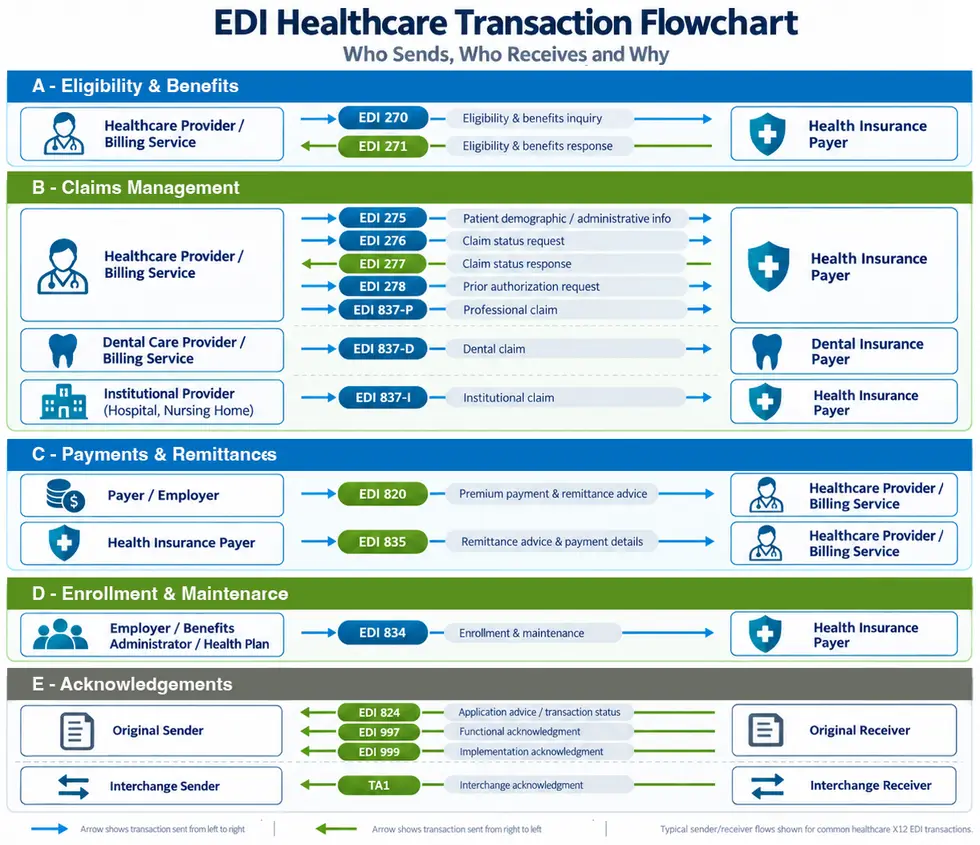
The key X12 EDI transaction sets for Healthcare including HIPAA are:
-
-
- EDI 270 Eligibility, Coverage or Benefit Inquiry
- EDI 271 Eligibility, Coverage or Benefit Response
- EDI 275 Patient Information
- EDI 276 Healthcare Claim Status Request
- EDI 277 Healthcare Claim Status Notification
- EDI 277 Healthcare Claim ACK (277CA)
- EDI 278 Healthcare Services Review – Request for Review
- EDI 820 Payment Order/Remittance Advice
- EDI 824 Application Advice
- EDI 834 Benefit Enrollment and Maintenance
- EDI 835 Healthcare Claim Payment/Advice
- EDI 837-P Healthcare Claim: Professional
- EDI 837-D Healthcare Claim: Dental
- EDI 837-I Healthcare Claim: Institutional
- EDI 997 Functional Acknowledgment for Healthcare Insurance
- EDI 999 Implementation Acknowledgment for Healthcare Insurance
- EDI TA1 Interchange Acknowledgment
-
EDI Message Basics
EDI messages begin with a header identifying the kind of message being sent. That header is followed by a number of components called segments. These are provided in the sequence specified by the message specification, e.g., EDI 837 Specification. Each segment is further divided into fields, which contain a value using a data type specified by the standard. Messages, segments and fields are delimited by special characters which vary depending upon the standard. Fields may be further subdivided into components and subcomponents. A single segment or groups of segments can repeat (these are called loops in the X12 world), allowing complex structures to be communicated.
Segments begin with a 2 or 3-letter code like ST or ISA. Some segments are mandatory, while some are not. The mandatory segments of X12 are:
- ISA – interchange header that contains information about the sender and recipient.
- GS – functional group header segment of a set of X12 documents of the same document type (transaction set). Includes information (codes) about the functional group: sender, recipient and date/time.
- ST – transaction set header segment marking the start of a transaction set.
- SE – transaction set trailer segment marking the end of a transaction set.
- GE – functional group trailer segment of the same transaction set. Includes information on the number of functional groups and the control group number; marks the end of a group of transaction sets.
- IEA – end of the interchange, including the interchange control reference number and information on the number of functional groups.
The hierarchical structure of an EDI message enables transaction sets/messages and groups to be batched. Even if an interchange contains only one transaction set/message and only one group, that interchange is structured with the same basic elements as it would be if it were batched, except that there would not be multiple transaction set/message or group elements.
PilotFish embeds deep knowledge of the X12 schemas and standards within the eiConsole and eiPlatform product suite. PilotFish delivers breakthrough productivity-boosting features that strip away the technical complexity of parsing, validating, mapping and producing X12 EDI files.
For more on PilotFish’s EDI tools and resources, go to the X12 EDI Integration overview page.
We invite you to take advantage of PilotFish’s full version: a FREE 90-day Trial Download of the eiConsole for X12 EDI. Users can try out our new EDI Transformation Module and Format Builder. With the Quick Start Tutorial, users can complete an end-to-end interface in less than 20 minutes and get a real sense of how easy PilotFish’s solutions and software are to use. See detailed product documentation & tutorials in the PilotFish Knowledge Hub.
If you’re curious about the software features, free trial, or even a demo – we’re ready to answer any and all questions. Please call 813 864 8662 or click the button.
X12, chartered by the American National Standards Institute for more than 35 years, develops and maintains EDI standards and XML schemas.